Desertcart purchases this item on your behalf and handles shipping, customs, and support to Angola.
💼 Elevate your digital workspace with storage that keeps pace with your ambition.
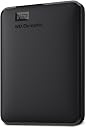
The WD 4TB Elements Portable External Hard Drive offers a robust 4TB storage capacity with USB 3.0 connectivity for fast data transfers. Its compact, lightweight design makes it ideal for professionals on the move, while plug-and-play compatibility ensures effortless setup with Windows PCs. Built with WD’s trusted reliability and backed by a 2-year warranty, this sleek black drive is perfect for expanding your digital storage and boosting your PC’s performance.


| ASIN | B0713WPGLL |
| Best Sellers Rank | 292 in Computers & Accessories ( See Top 100 in Computers & Accessories ) 5 in External Hard Drives |
| Box Contents | Portable hard drive, USB 3.0 cable |
| Brand | Western Digital |
| Brand Name | Western Digital |
| Cache Memory Installed Size | 4 |
| Color | Black |
| Compatible Devices | Festplatte |
| Connectivity technology | USB |
| Customer Package Type | Standard packaging |
| Customer Reviews | 4.7 out of 5 stars 275,949 Reviews |
| Data Transfer Rate | 1 Megabytes Per Second |
| Digital Storage Capacity | 4 TB |
| Digital storage capacity | 4 TB |
| Enclosure Material | Made from high quality materials. |
| Form Factor | 2.5-inch |
| Hard Disk Average Latency | 1 Milliseconds |
| Hard Disk Description | Mechanical Hard Disk |
| Hard Disk Form Factor | 2.5 Inches |
| Hard Disk Interface | USB 3.0 |
| Hard Disk Rotational Speed | 5400 RPM |
| Hard disk form factor | 2.5 Inches |
| Hard disk interface | USB 3.0 |
| Hard-Drive Size | 4000 GB |
| Hardware Connectivity | USB 3.0 |
| Installation Type | External Hard Drive |
| Item Dimensions L x W x Thickness | 11.2L x 8.1W x 2.1Th centimetres |
| Item Type Name | WD ELEMENTS PORTABLE 4TB BLACK WORLDWIDE |
| Item Weight | 0.52 Pounds |
| Manufacturer | WD |
| Manufacturer Part Number | WDBU6Y0040BBK-WESN |
| Media Speed | 1 |
| Model Name | WDBU6Y0040BBK |
| Model Number | WDBU6Y0040BBK-WESN |
| Network Connectivity Technology | USB |
| Number of Items | 1 |
| Product Features | Portable |
| Product Warranty | 2 Years |
| Read Speed | 1050 Megabytes Per Second |
| Special feature | Portable |
| Specific Uses For Product | Data Storage |
| UPC | 718037855981 |
| Unit Count | 1.0 count |
J**M
Compact, Fast and Perfect for Everyday Backups
This WD external hard drive is small, lightweight and very easy to use. It works straight out of the box with plug and play on Windows, and it only takes a quick reformat to use with Mac. The 1TB storage is plenty for photos, videos, documents and backups. Transfer speeds are fast with USB 3.0, and files copy smoothly without any issues. It feels well made and reliable, and it fits easily in a pocket or bag for travel. Overall, this is a great option if you want simple, portable and dependable storage at a very reasonable price. I would definitely recommend it.
P**R
Reliable and quiet
I've had a fair few of these drives over the years and I've never had a 2.5" WD Passport drive fail. Even my ancient 250GB WD Passport drives still work. The longer I live, the more storage I seem to need. I used to think the "Ultra" drives were faster than the USB3 drives, but on my PC, there doesn't seem to be much in it if anything, speed-wise. This 5TB drive is quiet, has a decent turn of speed, though not blisteringly fast, and I expect it to give many years of reliable service. Supplied with a short USB A (3) USB B (3) lead, it's simply plug and play and Windows recognises it and allows you to use it. It comes supplied with some WD software, but I just popped that in a folder unused, as the WD Passport drives always work fine out of the box. My drive was made in Thailand, and looking at a few of them, most of my WD Passport drives were made in Thailand (even the really old 250GB ones), though I have one which was made in Malaysia. Oddly enough, the Malaysian drive is my only WD Passport I've got that's a little bit noisy as it vibrates slightly in use. It works fine, but I'm guessing if I do ever get an external 2.5" drive fail on me, it'll be that one. All the others I have are quiet. Whatever you need external storage for, the WD Passport drives are excellent, and when you upgrade your PC, you don't need to faff about transferring all your data over if you use these drives. Highly recommended!
T**R
Amazing storage drive
This is a really good storage drive. I love how easy it is to carry around with me, making it perfect for everyday use and travel. In my experience, it is completely silent during operation, which is a great advantage. Installation is extremely simple all you need to do is plug it in and it's ready to use straight away. I also like its clean, simple design. The drive is versatile, working seamlessly with both Windows and Mac devices and it provides a reliable connection for transferring and storing files. Overall, I am very pleased with this storage drive and would recommend it to anyone looking for a portable, easy to use storage drive.
S**Y
Works Fine
I am 71 and know next to nothing anout computers, but I don't suppose I'm alone in that, so perhaps the following might be of use. I hope so. This was almost too straight-forward! I expected it to be "plug and play" but no instructions came up on the screen when I did so. After some time I discovered that it was detected by my (Windows11) PC, under "This PC", but I was at a loss how to make it "work". Eventually, after referring to Chat GPT, I discovered that you simply "drag and drop" any files/documents/pictures onto it. When I became more confident I dragged and dropped my entire "My Documents", onto it, which it swallowed up in a very few minutes. I was relieved to find that they were indeed copied onto the device, and not transferred onto it; my Documents remained on my PC. I am now wondering how it "knows" when I have made a small amendment to a single document next time I do a backup, or whether it will copy my entire Documents all over again, which seems a terrible waste of effort. Finally, I wondered whether there was a minor fault because it had a memory available of 1.81TB all through my experimenting with it, but then, having swallowed pretty much my entire life's work, it now says 1.80 TB. In other words, all my documents, files, pictures and videos have taken up one 181st of its available memory. I could probably have made do with the 1TB version! In summary, a good device but we older customers would appreciate a modicum of basic instruction.
R**Y
Recommended by Computer Tech & So Easy to Use
I was in the market for a portable hard drive as my laptop has limited storage. Additionally, working on multiple devices, it is an easy way to transport documents, enabling them to be opened and edited at a time and place to suit. WD was a brand recommended to me by the technician who services my computer equipment, so I felt confident in selecting the brand. After reading up on a number of alternatives I decided on 1TB unit by Western Digital. This was competitively priced and wasn't much more expensive than one with half the capacity, so it was a no brainer. Once opened, simply plug in to your device using the USB lead provided and away you go. For example, if you have a word document open that you wish to save to the drive, simply press “save as”, locate the WD on your control panel, open the folder and click “save”. I have to say that this is perfect for my requirements. The unit is very compact, has a large memory capacity and stores all of my personal and important documents off of my computer’s inbuilt storage. It has also increased the speed of my laptop by transferring these documents from my computer, which was an added bonus. Best Uses : To free up space and back up your laptop’s (or other device’s) internal hard drive. Pros : Excellent value, compact size, easy to set up, sleek, compatible with Windows 10. Cons : None. In summary : A very good, competitively priced portable hard drive. I hope you found my review helpful and would love for you to click “yes” if you did.
O**A
Great for the money
Great HDD. Still going strong
R**R
Beware once it’s out of warranty
This is a great WD product that I thought would be like the other 40-50 I’ve bought and upgraded via a resell and use that cash toward a larger storage one or buying a great value one on sale. I bought this and it worked perfectly till it was about a couple of weeks before the 2 year warranty finished. I only found that out after checking it when I could no longer recover the files via Disk Warrior as I have now bought a larger capacity non WD product. This has shattered the faith I had in WD. I did explain when I called them it was just out of warranty and the fault was noticed before it was out. I got the new drive on order and it arrived and the drive was formatted the way I prefer. I connected the new drive and the WD to my laptop and the WD did T boot, not even to Disk Warrior. The drive had not been used since the fault was found. I tried to see if WD would do what they did the last time I had a manufacturing fault & replace the drive and contents. I sent off the drive to them and they found all the programmes and files, custom settings etc too. I had a lot of Audio programmes and settings like a drummers particular settings for all their drums and cymbals sounds and you could load the generic up when the kit is set up and miked. The generic saved settings would save about 2-3 days of settings and runs to get them sounding the way you wanted Vital when you’re talking about $10’s of thousands a day for the studio let alone the cost of staff etc. They replaced ALL of the contents which would have been about £53,000 not to mention the time allocating the custom settings and the correct folders , then authorising them too. There would have been over 3,400 at least (this is going by my back up book I have with the basics on a shorthand version. Would have taken months to get them so E manually, loading each individual … compressor for example and typing the setting then saving, unloading it then over and over …… I’m no longer a WD fan and it’s a shame after over 25 years of using them.
S**I
WD 1TB Elements Portable External Hard Drive
HD is what made me purchase it. Also it is made by a well-known company/brand name so I thought would give it a go and I am very happy I did, It comes NTFS formatted but easy to reformat for Mac OS X and Time Machine use. The drive is all hard black plastic with a matt finish apart from a glossy narrow top seam, Nice and small and quiet The cable is 45cm long (including connectors) and the connector for the drive end is the newer Micro B USB 3.0, a long flat shape with a notch to one side which more common USB 2.0 cables will not fit so make sure you don't lose this one. No external power adapter needed as it runs off the laptop USB port I believe that the drive does come with some software and a "read me" pdf file. But it pretty much plug and play as I didn’t look at the software or PDF and from the moment I took it out just plugged it in and my laptop recognised it straight away, It seems to copy over large amounts of data quite quickly and smoothly. I haven’t had any issues yet. I have found this HD to be very reliable so I bought one for my Girlfriend too. As a non techie person she has been meaning to back up all her personal data files and a large amount of jpg photos taken over the years, most of which are currently scattered around the house on various CDs. So for her the just plug it in and away you go feature could not be easier for her. She stated that it is nice and small so would be easy to carry around with her in the handbag. Very happy with this product and would suggest it to others
Y**O
4.5
ممتازة لكن بطئيه
M**K
Excellent Value and Performance
I recently purchased the WD 4TB Elements Portable USB 3.0 High Capacity Hard Drive and I am extremely satisfied with my purchase. The drive is compact and easy to use - just plug it into my computer's USB port and I'm good to go. The 4TB of storage is more than enough for my needs, and the transfer speeds are reasonable for a standard 5400rpm HDD.. One thing that initially concerned me was the drive's tendency to get hot during use. However, I have used it extensively over the past few weeks and have not experienced any issues with overheating. In terms of value, I believe the WD 4TB Elements Portable USB 3.0 High Capacity Hard Drive offers excellent value for the price and the high capacity and decent transfer speeds make it well worth the investment. If you need a lot of storage on the go and are looking for a reliable and high-performance option, I highly recommend the WD 4TB Elements Portable USB 3.0 High Capacity Hard Drive.
P**A
Excelente, me salvó la vida!
Excelente producto! Lo compre y decidí usarlo como respaldo dónde guardé muchas fotos y documentos y me olvidé de él por completo. Este mes decidí descargar todos esos documentos de otra memoria externa que tenía y descubrí que todos mis archivos se habia perdido. Me puse muy triste hasta que me acordé de esta memoria externa y gracias a Dios todo estaba ahí intacto! La verdad si vale la pena tener memorias externas de excelente calidad, y varias, por si acaso. Me salvó la vida!
G**9
Excellent disque de grande capacité
Utilisateur, depuis plusieurs décennies, d’informatique et par voie de conséquence de disques durs ; dans cette catégorie, je considère les WD comme le top des disques « classiques » à plateaux. Leur fiabilité et leur durée de vie sont parmi les meilleures du marché ( je n’ai jamais eu un disque dur WD crashé !). Cette version « Elements » est compacte, légère et silencieuse, et ne nécessite pas, comme les gros disques 3.5 pouces, d’alimentation externe. Commandé et reçu très vite (Bravo et merci Amazon pour le service). L’emballage du disque est parfaitement d’origine, scellé et protégé, accompagné d’une notice et du câble USB 3. Ce type , micro B, étant surtout utilisé avec ce type de disque dur, je recommande de le laisser connecté en permanence au disque, ce qui évitera de l’endommager. Sitôt reçu, testé : Déjà formaté en NTFS Windows, il y a juste à le brancher. Attention, si destiné au MAC, il faudra le formater par le MAC avec l’utilitaire disque si on ne l’utilise qu’avec un MAC. Si destiné à être utilisé à la fois sur PC et sur MAC, il faudra un logiciel de « conversion NTFS » sur le MAC (comme Paragon ou Tuxera) et le laisser en NTFS (c’est ce que je fais). Les tests : vérification état du disque avec outil Windows, du SMART avec AIDA, et des vitesses avec CrystalDiskInfo. Tous les tests sont OK, on voit que le disque n’a été allumé que 2 fois, ce qui prouve le contrôle des disques après fabrication (NB : made in Thailand et non China !). Pour la vitesse en USB3, les valeurs sont de 120 MB/s, ce qui est très correct. J’ai sauvegardé 580 Go de photos en 3 heures, en silence total et sans échauffement important. Je voudrais ici, apporter quelques informations complémentaires, contre-vérités destinées à certains utilisateurs insatisfaits, notamment concernant les capacités de ces disques. J’ai vraiment l’impression que certains « découvrent » les disques durs externes ! Il ne s’agit en aucune façon de tromperies, mensonges ou arnaques. Il faut simplement savoir qu’il s’agit d’une différence de langage et de mathématiques ! Tous les fabricants de disques ( classiques, SSD, clés USB…) comptent la capacité en DECIMAL ( Base 10 ). Un Téraoctet (To) est l’équivalent de 1 000 000 000 000 octets. Les programmes, comme les système d’exploitation, cas de WINDOWS, utilisent les système de numérotation binaire ( Base 2) . Dans ce système, 1 To est équivalent à 1 099 511 627 776 octets. En fait, les 2 équivalent à la même capacité réelle. C’est comme si on mesurait une distance en Km et en Miles : les valeurs sont différentes, mais la distance réelle est la même. Pour les usagers MAC, les valeurs sont bien indiquées en décimal, Base 10, ce qui fait que la capacité donnée par le fabricant se retrouve réellement sur le MAC. C’est surtout Windows qui aurait dû modifier son « Go » dans l’unité standardisée en 1998 : le Kilo Binaire. Exemple : Un Gibioctet (Gio) = 1 073 741 824 octets Un Tébioctet (Tio) = 1 099 511 627 776 octets Si cela avait été modifié en Gio et Tio, il n’y aurait plus d’interrogation et de doute. En fait, si on regarde dans les « Propriétés » des disques la valeur en octets est donnée et correspond bien à la capacité du disque. Pour confirmer ceci, par exemple un fichier de 25 Mo sur MAC, devient 23,4 Mo sous windows. Autres bizarreries dans les commentaires : Une dizaine de films enregistrés, remplissent complètement un disque de 5 To. Cela semble impossible, car si on prend les plus gros films en 4K UltraHD+ BluRay, ils font au maxi 90 Go. Soit environ 1 To la dizaine !! on est loin de la saturation. Egalement, quand je lis « impossible de formater en FAT32 un disque de 4 To…… bien sûr que cela n’est pas possible , ce système est limité dèjà à moins de 4 Go pour les fichiers. Il faut être en NTFS ou en ExFAT, qui n’ont pas les mêmes limites. Je fais généralement peu de commentaires sur ce que j’achète, mais au vu de ces commentaires « négatifs » je souhaitais intervenir. Je n’ai aucun lien avec WD et autres fabricants, mais j’utilise pas mal de disques ou autres procédés de stockage, mais tous sont des fabricants reconnus et fiables. En résumé, ce disque de grande capacité est d’un excellent rapport qualité/prix et mérite ces 5 étoiles. Je suis souvent étonné que certains mettent 4 étoiles et qq fois 3, alors que leur commentaire est positif. A partir du moment où un produit réuni TOUTES les qualités attendues : Livraison, emballage, utilisation, fiabilité, etc SANS réserves, il n’ y a pas lieu de mettre autre chose que 5 étoiles. Désolé d’avoir été un peu long, mais le sujet en valait la peine.
D**A
Great hard drive. Everything is great about it. Go for it.
This is a great hard drive. I previously had a 1 TB hard drive of WD and that worked really fine. That is why I decided to go for a 2TB hard drive of WD. Though, Seagate hard drives are much better than WD because they are thinner and they sustain for a long time like WD. I purchased it @Rs. 5599. Pros- 1. WD is a very reliable name in the field of hard drives. So it is reliable. 2. 2-year warranty. 3. small in size. 4. Reading speed is amazing. I got around 150 MBps/ 1.2 Mbps while reading. (Data was a movie and USB port was USB 3.0) 5. Writing speed is also great. I got around 55 MBps/ 440 Mbps while writing on the hard drive. (Data was a movie and USB port was USB 3.0) 6. The speed of reading and writing on USB 2.0 ports is also great. 7. USB 3.0 cable is already included in the package. So you don't need to purchase a USB 3.0 cable separately. 8. The length of the cable is enough for normal usage. 9. The product is original. So you can get is registered on WD website. You will also get your warranty from there. 10. Cheaper than Seagate models. (in general) Cons- 1. If you are in need of a long USB 3.0 cable then you will be disappointed. The length of the cable is just enough for normal usage. 2. The hard drive is somewhat thick. You will get a Seagate hard drive of the same capacity to be slimmer. Final comment- If the price is not a big issue for you and you want a slimmer hard drive then go for Seagate hard drive. Else this is certainly one of the best choices.
Trustpilot
5 days ago
3 weeks ago